
Published: 15 September 2026 | Last updated: 15 September 2026. All fees, processing times, and requirements verified against the K-ETA portal (k-eta.go.kr). This is an independent informational guide, not affiliated with or endorsed by the Korean government.
A K-ETA application error such as wrong passport numbers, name typos, photo rejections, and payment failures can be fixed by editing before approval or reapplying after rejection with a new 10,300 KRW fee. Each error type has a specific cause and step-by-step solution for UK travellers in 2026.
Before You Apply – Prevention Checklist and UK Citizen Guide
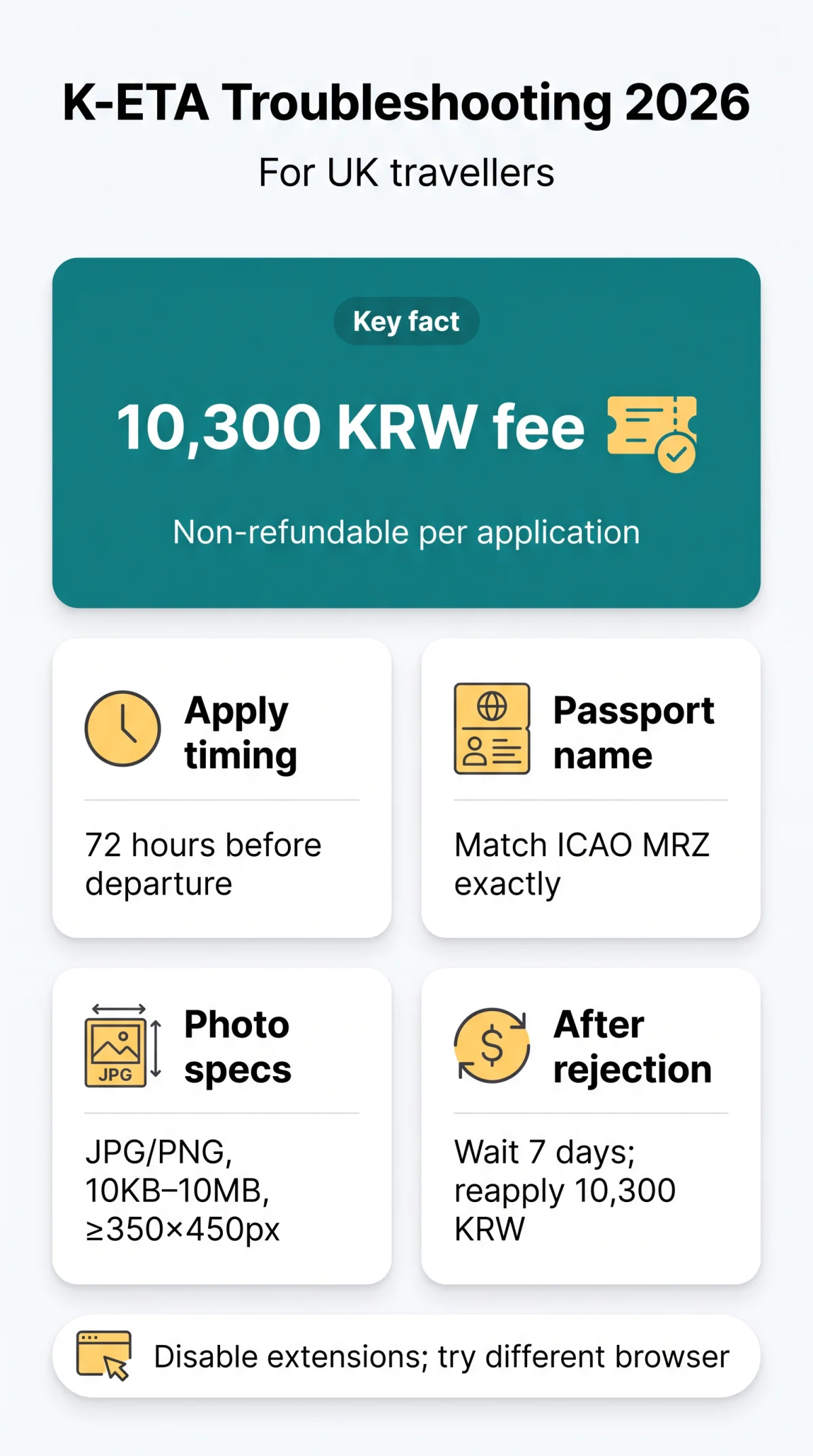
A pre-application checklist covering passport validity and British passport formatting prevents most K-ETA application errors. The total fee is 10,000 KRW base + 300 KRW processing = 10,300 KRW (~£5.50), non-refundable even if denied.
- Confirm your passport has at least 3 months validity remaining beyond your planned entry date.
- UK citizens must obtain K-ETA before travelling to South Korea for stays up to 90 days (requirement applies since November 2021; latest exemption extension notice published 2026-03-20).
- Enter your name exactly as printed in your passport’s ICAO machine-readable zone: middle names appended to the given name, apostrophes and hyphens entered as shown on the passport.
- A single K-ETA application error can cost a new fee: budget for the 10,300 KRW total per attempt.
- Apply at least 72 hours before departure; real-world processing ranges from 30 minutes to 24 hours.
UK Passport Name Formatting Examples
| Passport Name | Given Name Field | Surname Field |
|---|---|---|
| John Robert Smith | JOHN ROBERT | SMITH |
| Mary O’Brien | MARY | O’BRIEN |
| James Smith-Jones | JAMES | SMITH-JONES |
K-ETA Passport Number and Name Errors – Fixing Invalid Data Entries
The two most frequent K-ETA application errors are invalid passport number and name mismatch. Both are fixed by correcting entries against the passport ICAO machine-readable zone (MRZ). Discrepancies in passport data lead to rejection.

“Invalid Passport Number” Error
K-ETA application errors involving wrong passport numbers occur when digits are transposed or a previous passport number is entered. The portal displays “Invalid Passport Number” or “Passport data does not match” when discrepancies are detected. The K-ETA portal requires an exact match with your current passport data.
Locate the MRZ
Open your passport to the photo page and locate the machine-readable zone (MRZ) at the bottom.
Enter manually
Enter the passport number manually. Do not rely on the passport OCR feature, which can misread characters from an uploaded scan.
Verify every digit
Verify every digit against the MRZ immediately before final submission.
If the error persists after correction, use the “Ask Us” form on the K-ETA portal for assistance.
“Name Does Not Match Passport” Error
A known K-ETA application error documented in K-ETA FAQ Q57 (published 2025-08-28) enters your full name into the surname field when scanning. The portal displays “Name Does Not Match Passport”. Manual entry is recommended over uploaded pictures or scans to prevent this fault.
- Compare each name field on screen with the MRZ line of your passport.
- Enter your surname and given name exactly as printed, with no abbreviations or reordered elements.
- Re-check all fields against the passport before submitting.
K-ETA Photo and Missing Information Errors – Fixing Incomplete Submissions
K-ETA photo rejections and missing-field errors display specific messages. The portal shows “Photo file is too large. Maximum size is 10 MB” or “Photo resolution is below minimum 350×450 px” for file issues. Required photo specs: JPG/PNG file, 10 KB to 10 MB, minimum 350×450 pixels, plain white background with even lighting. Completing all mandatory fields prevents the K-ETA application error of incomplete submission.
“Photo Does Not Meet Requirements” Error
K-ETA application errors caused by low-quality photo rejection occur when the uploaded image fails to clearly identify the applicant. Acceptable files must meet all of the following:
- Format: JPG or PNG
- File size: 10 KB to 10 MB
- Minimum resolution: 350×450 pixels
- Background: plain white with even lighting, no shadows or glare
Blurry or overexposed photos are more common when uploading from a desktop; use the K-ETA app’s built-in camera guide on mobile for better results. Religious head coverings such as a hijab are permitted, per K-ETA FAQ Q54 published 2025-03-13.
“Missing Required Information” Error
K-ETA application errors involving missing mandatory fields display “Please enter required information” and stop submission when required data is left blank. Required fields include:
- Accommodation address in South Korea
- Emergency contact details
- Travel dates and accompanying travellers
- Previous immigration or legal history
Inconsistent travel information across fields triggers validation failures. Review all entries against your passport and booking confirmations before submitting.
K-ETA System and Technical Errors – Email, Payment, and Browser Fixes
K-ETA system errors include: “Email verification loop” (capitalisation mismatch between attempts), “3DS ERROR” at checkout (UK bank card not enrolled in 3D Secure), blank screen after “make payment” on Chrome/Safari (browser rendering failure), and “Session timed out” (inactivity or repeated clicks triggering server-side protection). Each K-ETA application error listed below maps to a known root cause and a single corrective action.
Email Verification Errors
| Error | Root Cause | Fix |
|---|---|---|
| Repeated email verification requests (“Email verification loop”) | Entering the email address with different capitalisation between attempts | Use identical capitalisation each time; switch to Outlook or Yahoo. Gmail may delay delivery (K-ETA notice, 2026-03-13) |
Payment Gateway Failures (3DS, Blank Screen)
| Error | Root Cause | Fix |
|---|---|---|
| “3DS ERROR” at checkout (K-ETA FAQ Q52, 2025-03-13) | Bank blocked the international transaction; UK-issued card not enrolled in 3D Secure | Contact your card issuer to enable international transactions and 3D Secure authentication, then retry |
| Blank screen after “make payment” on Chrome/Safari | Browser rendering failure (affects iPhone app and PC browsers) | Switch browser or device; clear cache and retry |
Session Timeout and Browser Compatibility
| Error | Root Cause | Fix |
|---|---|---|
| Session locked / IP ban | Repeated “resend” clicks triggering server-side protection | Wait for the session to clear; avoid rapid repeated clicks |
| Form corruption or submission failure | Pop-up blockers, auto-translators, ad-blockers interfering with scripts | Disable all browser extensions before applying |
K-ETA Errors After Approval – What You Can and Cannot Fix
After K-ETA approval, only the Korean address, postal code, and contact number are editable. Passport number, name, or nationality errors constitute a K-ETA application error that requires a new application and the non-refundable fee (see breakdown above).
Post-Approval Correction Matrix
K-ETA application errors discovered after approval fall into two categories: fields you can update through the portal and fields that invalidate the authorisation entirely. Travellers who fly with uncorrected data face entry restrictions at Korean immigration.
| Error Type | Editable? | How to Fix |
|---|---|---|
| Korean residential address | Yes | Update via the K-ETA portal |
| Postal code | Yes | Update via the K-ETA portal |
| Primary contact number | Yes | Update via the K-ETA portal |
| Passport number | No | New application required (new fee, see breakdown above) |
| Full name | No | New application required (new fee, see breakdown above) |
| Nationality | No | New application required (new fee, see breakdown above) |
| Date of birth | No | New application required (new fee, see breakdown above) |
A newly issued passport also triggers a mandatory reapplication. A K-ETA linked to a previous passport cannot be used. For edge cases, use the “Ask Us” form on the K-ETA portal. The K-ETA Center (telephone 02-2666-0463) does not provide telephone or face-to-face consultations.
K-ETA Rejection – How to Reapply Successfully in 2026
A rejected K-ETA requires a new application and another non-refundable fee (see breakdown above). No cooldown exists, but traveller reports suggest a 7-day wait clears server-side flags. K-ETA application errors that trigger rejection are screened under non-disclosed criteria, and no appeal route exists within the K-ETA system; denied applicants must pursue a consular visa instead.
Reapplication Steps
Wait 7 days
Wait at least 7 days after rejection before submitting a new application to clear any server-side flags from the previous attempt.
Review every field
Review every field against your passport using the ICAO machine-readable zone to eliminate the K-ETA application error that caused the initial denial.
Prepare new payment
Prepare a new payment of 10,300 KRW (~£5.50); the fee is non-refundable even if the second application is denied.
Submit corrected application
Submit the corrected application through the K-ETA portal. If rejection persists without explanation, use the “Ask Us” support form for assistance.
FAQ
Can I edit my K-ETA application after submission?
Before approval, limited edits are possible via the portal. After approval, only the Korean address, postal code, and contact number can be changed. Passport details and name require a new application with a new fee (see breakdown above).
What happens if I enter the wrong passport number on my K-ETA?
Your K-ETA will be linked to incorrect passport data and may be rejected at immigration. You must cancel and reapply with the correct number. The fee is non-refundable and you must pay the full application fee again for each new submission.
Why is my K-ETA application not going through?
Common causes include browser incompatibility, pop-up blockers, session timeout, payment failure, or server congestion. Follow the browser compatibility guidance and try a different browser. Browser extensions like auto-translators or ad-blockers can also corrupt the form, causing a K-ETA digital application failure.
How long does K-ETA take to process in 2026?
The published guideline is 72 hours. Most applications are processed within 30 minutes to 24 hours. Peak travel seasons and AI-screened applications may take longer. If an error is found during assessment, the application may be delayed beyond the standard 72-hour window or denied.
Do UK citizens need K-ETA for South Korea?
Yes, UK citizens must obtain a K-ETA before travelling to South Korea for tourism or business stays up to 90 days. The requirement has applied since November 2021, reinstated after temporary exemptions ended. The latest exemption extension notice was published on 2026-03-20.
Can I reapply immediately after my K-ETA is rejected?
No cooldown period exists, but waiting at least 7 days is recommended based on traveller reports to clear server-side flags. Each reapplication requires a new payment of the non-refundable fee. Unsuccessful applicants who cannot resolve errors must submit a consular visa application instead.
What file format and size should my K-ETA photo be?
Your photo must be a JPG or PNG file, between 10 KB and 10 MB, with a minimum resolution of 350×450 pixels. Use a plain white background with even lighting. Religious head coverings like hijabs are permitted per K-ETA FAQ Q54.
Why does K-ETA keep asking me to verify my email?
Typically caused by entering the email address with different capitalisation between attempts, or using Gmail which may have delivery delays (K-ETA notice 2026-03-13). Try Outlook or Yahoo with identical capitalisation each time to resolve this K-ETA application error.
What does “3DS ERROR” mean when paying for K-ETA?
3D Secure is an authentication step required by your bank for international transactions. The error means your bank blocked the payment. Contact your bank to enable international transactions and 3DS authentication, then retry. This is confirmed in K-ETA FAQ Q52.
If I get a new passport, do I need a new K-ETA?
Yes. A K-ETA is linked to a specific passport number. Even with the same name, a new passport requires a new K-ETA application and fee. A K-ETA linked to a previous passport cannot be used.
How long does K-ETA take to process if there is an error in my application?
If an error is found during assessment, the application may be delayed beyond the standard 72-hour window or denied. Correcting and resubmitting restarts the processing clock. Review all fields against your passport before resubmission to avoid repeating the same K-ETA application error.
Can I apply for K-ETA at the airport if my online application has errors?
No. K-ETA must be obtained online before departure. There is no airport counter for K-ETA applications. Apply at least 72 hours before your flight through the K-ETA portal. If you cannot resolve errors in time, contact the nearest Korean embassy or consulate for a consular visa.